Showing posts with label featured. Show all posts

Friday, September 23, 2011

Oneiric server, Deploy Server fleets p2

Welcome to the second installment of this article series. In the first part of this article we installed an Ubuntu server instance, made sure it became an orchestra installation server. If this is new to you, Orchestra is a new Oneiric server feature that enables admins to very easily deploy fleets of Ubuntu servers. Let's pick up where the first article stopped

First, let's check where we are. You see installing the orchestra server, it automatically downloads and imports various Ubuntu server ISOs and creates all the needed structure (distros, profiles ...etc) in the underlying cobbler system. Let's see what have we

$ sudo cobbler list
distros:
   hardy-i386
   hardy-x86_64  
   lucid-i386
   lucid-x86_64  
   maverick-i386 
   maverick-x86_64
   natty-i386
   natty-x86_64  
   oneiric-i386  
   oneiric-x86_64

profiles:
   hardy-i386
   hardy-i386-juju
   hardy-x86_64
   hardy-x86_64-juju
   lucid-i386
   lucid-i386-juju
   lucid-x86_64
   lucid-x86_64-juju
   maverick-i386
   maverick-i386-juju
   maverick-x86_64
   maverick-x86_64-juju
   natty-i386
   natty-i386-juju
   natty-x86_64
   natty-x86_64-juju
   oneiric-i386
   oneiric-i386-juju
   oneiric-x86_64
   oneiric-x86_64-juju

systems:

repos:
   hardy-i386
   hardy-i386-security
   hardy-x86_64
   hardy-x86_64-security
   lucid-i386
   lucid-i386-security
   lucid-x86_64
   lucid-x86_64-security
   maverick-i386
   maverick-i386-security
   maverick-x86_64
   maverick-x86_64-security
   natty-i386
   natty-i386-security
   natty-x86_64
   natty-x86_64-security
   oneiric-i386
   oneiric-i386-security
   oneiric-x86_64
   oneiric-x86_64-security

images:

mgmtclasses:
   orchestra-juju-acquired
   orchestra-juju-available
woah! that sure makes my life easier. If you're interested to see where the isos were downloaded (like I was) here you are
ls /var/lib/cobbler/isos/
hardy-i386-mini.iso    lucid-i386-mini.iso    maverick-i386-mini.iso    natty-i386-mini.iso    oneiric-i386-mini.iso
hardy-x86_64-mini.iso  lucid-x86_64-mini.iso  maverick-x86_64-mini.iso  natty-x86_64-mini.iso  oneiric-x86_64-mini.iso

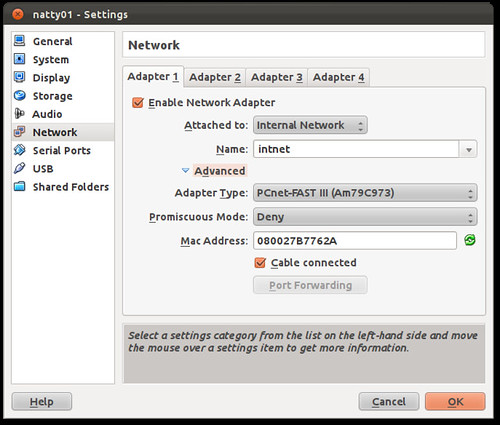
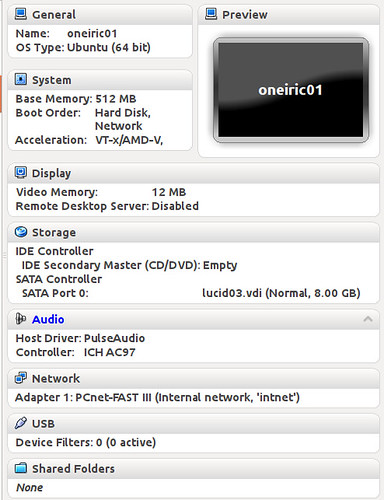
Let's create a new virtual box VM, to serve as our new "server" that needs to be installed. Here's how it looks for me
12-oneiric01-vboxsettings

One thing is worth noting however, it's that the NIC is placed on the "intnet" network, which has the IP range 192.168.77.0/24 that we configured in the first part of this article
13-vbox-natty01-netsettings

now the only "real" thing you have to do, is to add a profile on the orchestra server for your new bare server. The profile binds its mac address, to a name and an installation profile (think OS to install, kickstart ..etc)

sudo cobbler system add --name="oneiric01.ubuntu.lan" --mac-address="08:00:27:B7:76:2A" --ip-address="192.168.77.33" --dns-name="oneiric01.ubuntu.lan" --hostname="oneiric01.ubuntu.lan" --profile="oneiric-x86_64-juju" --mgmt-classes="orchestra-juju-available" --kopts=" DEBCONF_DEBUG=developer netcfg/dhcp_timeout=120 netcfg/choose_interface=eth0"
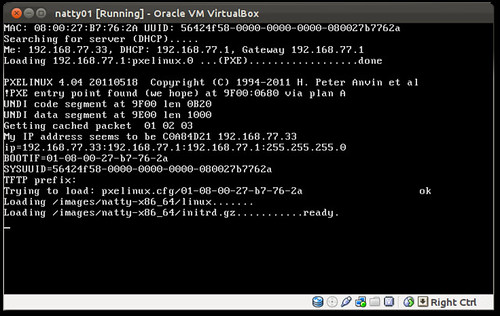
Boot the server, choose PXE (For vbox that's F12 then "l" that's an L)

14-natty-PXEbooting

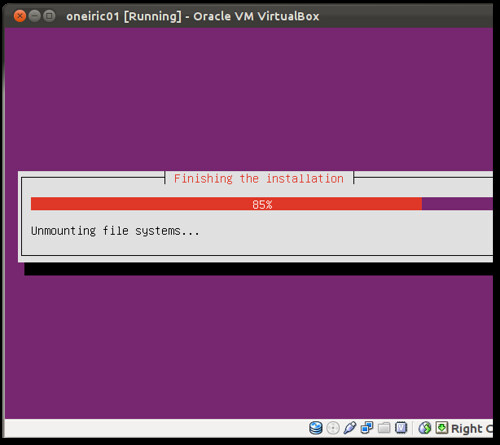
Watch the installer fly by (look ma hands free)

15-installer-running

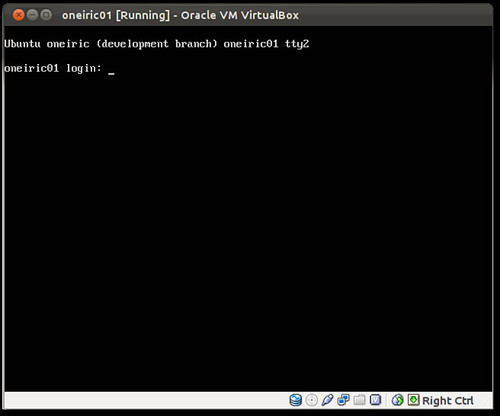
and your box is ready!
16-Oneiric01-ready

That's how easy it is to install a fresh server off your orchestra box! So basically the only thing you need to do per server, is to attach it to a profile and that's it. Boot it and it installs whatever you provisioned for it. Of course any good admin already did that manually before, but it took effort and it wasn't standardized. Now you can count on Ubuntu server covering your back when you're tasked with installing a hundred servers

How cool was that! Got thoughts, comments or rotten tomatoes ? Shoot me a comment

Friday, July 29, 2011

Ubuntu takes UFOs to the cloud


I've always believed in UFOs as a kid, and while I've never seen one (yet?) I am still more on the believer side! I was interested to stumble upon a database of UFO sightings at http://www.infochimps.com/tags/ufo# A shout-out at infochimps (you guys are great!). Downloading the sightings DB (around 80MB), I found a listing of 60,000 documented sightings, hmm interesting! I started thinking I could crunch on this data in some useful and fun way, what about finding the most commonly spotted UFO shape?! Sounds like I could use hadoop for that, just for the coolness factor really, the data is not that large anyway, but hey why not! I had no-idea how to get started with hadoop though and wasn't really interested in learning up all the gory details!

Well Ensemble to the rescue, hadoop master and slave formulas exist, which means someone else packaged the knowledge needed to setup and run a hadoop cluster for me. All I needed to do was ask Ensemble to deploy me a couple of cloud instances and start playing. Let's see how you can do that for yourself

I won't repeat the instructions to get started with Ensemble, since the documentation is a good place for that (and it's so easy anyway!). If you feel you need more help there, this little video should be helpful. If you're still stuck, you can always drop by on irc/freenode at #ubuntu-ensemble and ask your questions

Hadoop node, with an extra slave please


So, let's start ensembling
bzr branch lp:~negronjl/+junk/hadoop-master
bzr branch lp:~negronjl/+junk/hadoop-slave
ensemble bootstrap
wait a minute or two for EC2 to spin up the instance, then
ensemble status
which’ll give you output like
$ ensemble status
2011-07-12 15:20:54,978 INFO Connecting to environment.
The authenticity of host 'ec2-50-17-28-19.compute-1.amazonaws.com (50.17.28.19)' can't be established.
RSA key fingerprint is c5:21:62:f0:ac:bd:9c:0f:99:59:12:ec:4d:41:48:c8.
Are you sure you want to continue connecting (yes/no)? yes
machines:
  0: {dns-name: ec2-50-17-28-19.compute-1.amazonaws.com, instance-id: i-8bc034ea}
services: {}
2011-07-12 15:21:01,205 INFO 'status' command finished successfully

Now let's deploy a two node hadoop cluster
ensemble deploy --repository . hadoop-master
ensemble deploy --repository . hadoop-slave
ensemble add-relation hadoop-master hadoop-slave

Yeah it's that easy! Ensemble formulas manage all the kung-fu for you. The hadoop cluster is ready, let's ssh into the master node and switch to user hdfs
ensemble ssh hadoop-master/0
sudo -su hdfs

Downloading UFOs


Download the infochimps sightings database here, unzip it and locate the TSV file (tab separated values) file. Note that you can download the file from infochimps without registering on their website (didn't I say these guys were great :)

Upload the TSV DB to hadoop's distributed filesystem
hadoop dfs -copyFromLocal ufo_awesome.tsv ufo_awesome.tsv

Almost ready, the corpus has been uploaded. Now we need to write some map/reduce jobs to do the actual crunching. Not being a pro developer, the thought of writing that in java was like (oh no ew), so python to the rescue! Thanks to the great instructions at Michael Noll's blog, I was able to massage some of that code to get it to do what I wanted. I pushed my code to launchpad, so that you can grab it directly from the hadoop master node

cd /tmp
bzr branch lp:~kim0/+junk/ufo-ensemble-cruncher
cd ufo-ensemble-cruncher

Unleashing the elephant


Now for the big moment, let's launch the elephant
hadoop jar /usr/lib/hadoop-0.20/contrib/streaming/hadoop-streaming-*.jar -file ./mapper.py -mapper mapper.py -file ./reducer.py -reducer reducer.py -input ufo_awesome.tsv -output ufo-output
packageJobJar: [./mapper.py, ./reducer.py, /tmp/hadoop-hdfs/hadoop-unjar1418682529553378062/] [] /tmp/streamjob5701745574334998473.jar tmpDir=null
11/07/29 12:27:52 INFO mapred.FileInputFormat: Total input paths to process : 1
11/07/29 12:27:53 INFO streaming.StreamJob: getLocalDirs(): [/tmp/hadoop-hdfs/mapred/local]
11/07/29 12:27:53 INFO streaming.StreamJob: Running job: job_201107290935_0010
11/07/29 12:27:53 INFO streaming.StreamJob: To kill this job, run:
11/07/29 12:27:53 INFO streaming.StreamJob: /usr/lib/hadoop-0.20/bin/hadoop job  -Dmapred.job.tracker=domU-12-31-39-10-81-8E.compute-1.internal:8021 -kill job_201107290935_0010
11/07/29 12:27:53 INFO streaming.StreamJob: Tracking URL: http://domU-12-31-39-10-81-8E.compute-1.internal:50030/jobdetails.jsp?jobid=job_201107290935_0010
11/07/29 12:27:54 INFO streaming.StreamJob:  map 0%  reduce 0%
11/07/29 12:28:11 INFO streaming.StreamJob:  map 10%  reduce 0%
11/07/29 12:28:12 INFO streaming.StreamJob:  map 19%  reduce 0%
11/07/29 12:28:14 INFO streaming.StreamJob:  map 72%  reduce 0%
11/07/29 12:28:16 INFO streaming.StreamJob:  map 100%  reduce 0%
11/07/29 12:28:33 INFO streaming.StreamJob:  map 100%  reduce 100%
11/07/29 12:28:37 INFO streaming.StreamJob: Job complete: job_201107290935_0010
11/07/29 12:28:37 INFO streaming.StreamJob: Output: ufo-output

Woohoo success! Now let's grab the results, sorting it to easily see the most popular sighting shape

Is the answer really 42


hadoop dfs -cat ufo-output/part-00000 | sort -k 2,2 -nr
light   12202
triangle        6082
circle  5271
disk    4825
other   4593
unknown 4490
sphere  3637
fireball        3452
oval    2869
formation       1788
cigar   1782
changing        1546
flash   990
cylinder        982
rectangle       966
diamond 915
chevron 760
egg     664
teardrop        595
cone    265
cross   177
delta   8
round   2
crescent        2
pyramid 1
hexagon 1
flare   1
dome    1
changed 1

The answer is "light" then! Wow that was a blast! I had fun doing this exercise. Now I am no hadoop expert in any way (so direct those hadoopy questions to someone who can actually answer them), however I was quite pleased Ensemble could help me get up and running that fast. The Ensemble community is doing a great job wrapping many free software with formulas, such that you can always get up and running with any app you need in seconds rather than days (months?). You too can write Ensemble formulas for your favorite (server?) application. Hop on to #ubuntu-ensemble and grab me (kim0) or any of the dev team and ask any questions on your mind! We're a happy community

So was that fun? Can you think of something cooler you want to see done? Leave me a comment, let me know about it

Tuesday, June 28, 2011

Ensemble deploy and scale cloud apps

Think deploying and scaling your cloud application is hard ? Think again!

scalability

Check out this video demo, where I deploy a multi-tiered cloud application. I'm deploying

  • HAproxy load balancer
  • Memcached caching server
  • MediaWiki application server
  • MySQL DB
connecting them together and getting it working. After which, I'm scaling the whole thing from two application servers, to four

How long it takes me ? Well basically 5 minutes for the whole thing!
The secret: Ensemble !

Here's the video

Here is a direct link if you can't see the player

So what do you guys think, like the demo ? Leave me a comment, let me know which demo you'd like to see next. Also if you'd like to see your favorite application deployed with Ensemble, leave me a comment or ping me (kim0) on freenode irc

Thursday, June 23, 2011

Ensemble user tutorial p2


Welcome to the second part of this Ensemble user tutorial. In part 1 we bootstrapped an Ensemble environment, deployed a sample wordpress service and a MySQL service. Related the two services together and got ourselves a working wordpress installation. In this second part, let's check out viewing the debug-log output to understand the asynchronous nature of hook execution. You'll see how easy it is to "scale-up" a service deployment

Tracing hook execution 
An Ensemble user should never have to trace the execution order of hooks, however if you are the kind of person who enjoys looking under the hood, this section is for you. Understanding hook order execution, the parallel nature of hook execution across instances, and how relation-set in a hook can trigger the execution of another hook is quite interesting and provides insight into Ensemble internals
Here are a few important messages from the debug-log of this Ensemble run. The date field has been deliberately left in this log, in order to understand the parallel nature of hook execution.
Things to consider while reading the log include:
  • The time the log message was generated
  • Which service unit is causing the log message (for example mysql/0)
  • The message logging level. In this run DEBUG messages are generated by the Ensemble core engine, while WARNING messages are generated by calling ensemble-log from inside formulas (which you can read in the examples folder)
Let’s view select debug-log messages which can help understand the execution order:
14:29:43,625 unit:mysql/0: hook.scheduler DEBUG: executing hook for wordpress/0:joined
14:29:43,626 unit:mysql/0: unit.relation.lifecycle DEBUG: Executing hook db-relation-joined
14:29:43,660 unit:wordpress/0: hook.scheduler DEBUG: executing hook for mysql/0:joined
14:29:43,660 unit:wordpress/0: unit.relation.lifecycle DEBUG: Executing hook db-relation-joined
14:29:43,661 unit:wordpress/0: unit.relation.lifecycle DEBUG: Executing hook db-relation-changed
14:29:43,789 unit:mysql/0: unit.hook.api WARNING: Creating new database and corresponding security settings
14:29:43,813 unit:wordpress/0: unit.hook.api WARNING: Retrieved hostname: ec2-184-72-156-54.compute-1.amazonaws.com
14:29:43,976 unit:mysql/0: unit.relation.lifecycle DEBUG: Executing hook db-relation-changed
14:29:43,997 unit:wordpress/0: hook.scheduler DEBUG: executing hook for mysql/0:modified
14:29:43,997 unit:wordpress/0: unit.relation.lifecycle DEBUG: Executing hook db-relation-changed
14:29:44,143 unit:wordpress/0: unit.hook.api WARNING: Retrieved hostname: ec2-184-72-156-54.compute-1.amazonaws.com
14:29:44,849 unit:wordpress/0: unit.hook.api WARNING: Creating appropriate upload paths and directories
14:29:44,992 unit:wordpress/0: unit.hook.api WARNING: Writing wordpress config file /etc/wordpress/config-ec2-184-72-156-54.compute-1.amazonaws.com.php
14:29:45,130 unit:wordpress/0: unit.hook.api WARNING: Writing apache config file /etc/apache2/sites-available/ec2-184-72-156-54.compute-1.amazonaws.com
14:29:45,301 unit:wordpress/0: unit.hook.api WARNING: Enabling apache modules: rewrite, vhost_alias
14:29:45,512 unit:wordpress/0: unit.hook.api WARNING: Enabling apache site: ec2-184-72-156-54.compute-1.amazonaws.com
14:29:45,688 unit:wordpress/0: unit.hook.api WARNING: Restarting apache2 service

Scaling the ensemble
 
Assuming your blog got really popular, is having high load and you decided to scale it up (it’s a cloud deployment after all). Ensemble makes this magically easy. All what is needed is:
$ bin/ensemble add-unit wordpress
INFO Connecting to environment.
INFO Unit 'wordpress/1' added to service 'wordpress'
INFO 'add_unit' command finished successfully
$ bin/ensemble status
machines:
  0: {dns-name: ec2-50-16-61-111.compute-1.amazonaws.com, instance-id: i-2a702745}
  1: {dns-name: ec2-50-16-117-185.compute-1.amazonaws.com, instance-id: i-227e294d}
  2: {dns-name: ec2-184-72-156-54.compute-1.amazonaws.com, instance-id: i-9c7e29f3}
  3: {dns-name: ec2-50-16-156-106.compute-1.amazonaws.com, instance-id: i-ba6532d5}
services:
  mysql:
    formula: local:mysql-11
    relations: {db: wordpress}
    units:
      mysql/0:
        machine: 1
        relations:
          db: {state: up}
        state: started
  wordpress:
    formula: local:wordpress-29
    relations: {db: mysql}
    units:
      wordpress/0:
        machine: 2
        relations:
          db: {state: up}
        state: started
      wordpress/1:
        machine: 3
        relations:
          db: {state: up}
        state: started
The add-unit command starts a new wordpress instance (wordpress/1), which then joins the relation with the already existing mysql/0 instance. mysql/0 notices the database required has already been created and thus decides all needed configuration has already been done. On the other hand wordpress/1 reads service settings from mysql/0 and starts configuring itself and joining the ensemble. Let’s review a short version of debug-log for adding wordpress/1:
14:36:19,755 unit:mysql/0: hook.scheduler DEBUG: executing hook for wordpress/1:joined
14:36:19,755 unit:mysql/0: unit.relation.lifecycle DEBUG: Executing hook db-relation-joined
14:36:19,810 unit:wordpress/1: hook.scheduler DEBUG: executing hook for mysql/0:joined
14:36:19,811 unit:wordpress/1: unit.relation.lifecycle DEBUG: Executing hook db-relation-joined
14:36:19,811 unit:wordpress/1: unit.relation.lifecycle DEBUG: Executing hook db-relation-changed
14:36:19,918 unit:mysql/0: unit.hook.api WARNING: Database already exists, exiting
14:36:19,938 unit:mysql/0: unit.relation.lifecycle DEBUG: Executing hook db-relation-changed
14:36:19,990 unit:wordpress/1: unit.hook.api WARNING: Retrieved hostname: ec2-50-16-156-106.compute-1.amazonaws.com
14:36:20,757 unit:wordpress/1: unit.hook.api WARNING: Creating appropriate upload paths and directories
14:36:20,916 unit:wordpress/1: unit.hook.api WARNING: Writing wordpress config file /etc/wordpress/config-ec2-50-16-156-106.compute-1.amazonaws.com.php
14:36:21,088 unit:wordpress/1: unit.hook.api WARNING: Writing apache config file /etc/apache2/sites-available/ec2-50-16-156-106.compute-1.amazonaws.com
14:36:21,236 unit:wordpress/1: unit.hook.api WARNING: Enabling apache modules: rewrite, vhost_alias
14:36:21,476 unit:wordpress/1: unit.hook.api WARNING: Enabling apache site: ec2-50-16-156-106.compute-1.amazonaws.com
14:36:21,682 unit:wordpress/1: unit.hook.api WARNING: Restarting apache2 service

Destroying the environment
 
Once you are done with an Ensemble deployment, you need to terminate all running instances in order to stop paying for them. The shutdown command helps terminate all running instances:
$ bin/ensemble shutdown
Ensemble will ask for user confirmation of shutdown before proceeding as this will destroy service data in the environment as well.

Hope you enjoyed the article! If you find Ensemble interesting, please do visit us in #ubuntu-ensemble. We're a friendly bunch :) Do you want to write Ensemble formulas? Want to get the satisfaction of Ensemblizing your favorite application, grab me (kim0) on irc, and I will help you do it

Thursday, June 16, 2011

Ensemble user tutorial p1

I've been adding lots of documentation to help a new Ensemble user find her way around Ensemble. I thought it would nice to share this documentation as a series of blog posts, to raise its exposure and help interested users find their way quickly. Here is the first of a series of posts, which I hope you'll enjoy. If you think we can improve the docs in any way, please do let me know

Introduction

This tutorial demonstrates basic features of Ensemble from a user perspective. An Ensemble user would typically be a devops or a sys-admin who is interested in automated deployment and management of servers and services.

Bootstrapping
The first step for deploying an Ensemble system is to perform bootstrapping. Bootstrapping launches a utility instance that is used in all subsequent operations to launch and orchestrate other instances:
$ bin/ensemble bootstrap
Note that while the command should display a message indicating it has finished successfully, that does not mean the bootstrapping instance is immediately ready for usage. Bootstrapping an instance can require a couple of minutes. To check on the status of the Ensemble deployment, we can use the status command:
$ bin/ensemble status
If the bootstrapping node has not yet completed bootstrapping, the status command may either mention the environment is not yet ready, or may display a connection timeout such as:
INFO Connecting to environment.
ERROR Connection refused
ProviderError: Interaction with machine provider failed:
ConnectionTimeoutException('could not connect before timeout after 2
retries',)
ERROR ProviderError: Interaction with machine
provider failed: ConnectionTimeoutException('could not connect before timeout
after 2 retries',)
This is simply an indication the environment needs more time to complete initialization. It is recommended you retry every minute. Once the environment has properly initialized, the status command should display:
machines:
  0: {dns-name: ec2-50-16-61-111.compute-1.amazonaws.com, instance-id: i-2a702745}
  services: {}
Note the following, machine “0” has been started. This is the bootstrapping node and the first node to be started. The dns-name for the node is printed. Also the EC2 instance-id is printed. Since no services are yet deployed to the Ensemble system yet, the list of deployed services is empty

Starting debug-log
While not a requirement, it is beneficial for the understanding of Ensemble to start a debug-log session. Ensemble’s debug-log provides great insight into the execution of various hooks as they are triggered by various events. It is important to understand that debug-log shows events from a distributed environment (multiple-instances). This means that log lines will alternate between output from different instances. To start a debug-log session, from a secondary terminal issue:
$ bin/ensemble debug-log
INFO Connecting to environment.
INFO Enabling distributed debug log.
INFO Tailing logs - Ctrl-C to stop.
This will connect to the environment, and start tailing logs.

Deploying service units
Now that we have bootstrapped the Ensemble environment, and started the debug-log viewer, let’s proceed by deploying a mysql service:
$ bin/ensemble deploy --repository=examples mysql
INFO Connecting to environment.
INFO Formula deployed as service: 'mysql'
INFO 'deploy' command finished successfully
Checking the debug-log window, we can see the mysql service unit being downloaded and started:
Machine:1: ensemble.agents.machine DEBUG: Downloading formula
local:mysql-11...
Machine:1: ensemble.agents.machine INFO: Started service unit mysql/0
It is important to note the different debug levels. DEBUG is used for very detailed logging messages, usually you should not care about reading such messages unless you are trying to debug (hence the name) a specific problem. INFO debugging level is used for slightly more important informational messages. In this case, these messages are generated as the mysql formula’s hooks are being executed. Let’s check the current status:
$ bin/ensemble status
machines:
  0: {dns-name: ec2-50-16-61-111.compute-1.amazonaws.com, instance-id: i-2a702745}
  1: {dns-name: ec2-50-16-117-185.compute-1.amazonaws.com, instance-id: i-227e294d}
services:
  mysql:
    formula: local:mysql-11
    relations: {}
    units:
      mysql/0:
        machine: 1
        relations: {}
        state: null
We can see a new EC2 instance has now been spun up for mysql. Information for this instance is displayed as machine number 1 and mysql is now listed under services. It is apparent the mysql service unit has no relations, since it has not been connected to wordpress yet. Since this is the first mysql service unit, it is being referred to as mysql/0, subsequent service units would be named mysql/1 and so on.
Note

An important distinction to make is the difference between a service and a service unit. A service is a high level concept relating to an end-user visible service such as mysql. The mysql service would be composed of several mysql service units referred to as mysql/0, mysql/1 and so on.
The mysql service state is listed as null since it’s not ready yet. Downloading, installing, configuring and starting mysql can take some time. However we don’t have to wait for it to configure, let’s proceed deploying wordpress:
$ bin/ensemble deploy --repository=examples wordpress
Let’s wait for a minute for all services to complete their configuration cycle and get properly started, then issue a status command:
$ bin/ensemble status
machines:
  0: {dns-name: ec2-50-16-61-111.compute-1.amazonaws.com, instance-id: i-2a702745}
  1: {dns-name: ec2-50-16-117-185.compute-1.amazonaws.com, instance-id: i-227e294d}
  2: {dns-name: ec2-184-72-156-54.compute-1.amazonaws.com, instance-id: i-9c7e29f3}
services:
  mysql:
    formula: local:mysql-11
    relations: {}
    units:
      mysql/0:
        machine: 1
        relations: {}
        state: started
  wordpress:
    formula: local:wordpress-29
    relations: {}
    units:
      wordpress/0:
        machine: 2
        relations: {}
        state: started
mysql/0 as well as wordpress/0 are both now in the started state. Checking the debug-log would reveal wordpress has been started as well

Adding a relation
While mysql and wordpress service units have been started, they are still isolated from each other. An important concept for Ensemble is connecting various service units together to create a bigger ensemble! Adding a relation between service units causes hooks to trigger, in effect causing all service units to collaborate and work together to reach the desired end state. Adding a relation is extremely simple:
$ bin/ensemble add-relation wordpress mysql
INFO Connecting to environment.
INFO Added mysql relation to all service units.
INFO 'add_relation' command finished successfully
Checking the Ensemble status we see that the db relation now exists with state up:
$ bin/ensemble status
machines:
  0: {dns-name: ec2-50-16-61-111.compute-1.amazonaws.com, instance-id: i-2a702745}
  1: {dns-name: ec2-50-16-117-185.compute-1.amazonaws.com, instance-id: i-227e294d}
  2: {dns-name: ec2-184-72-156-54.compute-1.amazonaws.com, instance-id: i-9c7e29f3}
services:
  mysql:
    formula: local:mysql-11
    relations: {db: wordpress}
    units:
      mysql/0:
        machine: 1
        relations:
          db: {state: up}
        state: started
  wordpress:
    formula: local:wordpress-29
    relations: {db: mysql}
    units:
      wordpress/0:
        machine: 2
        relations:
          db: {state: up}
        state: started
You can now point your browser at the public dns-name for instance 2 (running wordpress) to view the wordpress blog


Patience is a virtue, you did read the full thing after all! I would really appreciate some feedback, what you liked, or did not like. And how we can improve the docs. Drop me a comment, shoot what's on your mind

Friday, May 20, 2011

Ensemble at UDS-O

UDS-O is now over, I had a chance to meet with the Ensemble team (a bunch of awesome engineers), also had a chance to attend or lead a few sessions concerning future directions of Ensemble. I'll try to summarize UDS outcome wrt Ensemble from a project newcomer perspective

  • Ensemble is now able to do a multi-machine deployment and orchestration
  • It can do Dynamic reconfiguration which means passing parameters to running formulas to adjust behavior. More work needs to land here, but the foundations are there
  • Does formula upgrades, more bits landing soon
  • Firewall auto-configuration (expose, unexpose services). Again, still more bits to land soonish
  • It has a ppa and docs from trunk live at https://ensemble.ubuntu.com/docs/
The focus for the 11.10 Oneiric cycle is going to be stability and polish. While currently Amazon EC2 is the only supported deployment target, the 11.10 cycle should hopefully see more targets added such as Linux Containers (LXC) for local development and testing of Ensemble formulas. Having LXC support in 11.10 is a bit optimistic, so if you can lend a helping hand, please do! Also Eucalyptus cloud support is the works (isn't this just great!)

During 11.10 as well, the infrastructure for Ensemble as a project should be improved. This involves adding better and more structured content to the Ensemble website. Adding more documentation, guides and screencasts. While you can start writing and contributing Ensemble formulas today! (ping me if you're interested) More work will go into refining the process and integrating it into the Ensemble command line tools.

That's mostly it. It is an incredibly interesting time for cloud technologies! Diving into discussions with the Ensemble team about the vision and decisions they have taken, I was blown away. I firmly believe Ensemble is a game changer with respect to rapid provisioning and orchestration. Right now, is such a great time to get involved with Ensemble. If you're interested in joining the Ensemble project, or in learning more about it in any way, please do leave me a comment here, or ping me on irc (kim0)

Wednesday, May 11, 2011

Cloud Portal one-click launch

Announcing two nice little additions to the cloud portal AMI tool that should make everyone's cloud life a little easier

  • Amazon now allows passing parameters to the AWS console to basically be able to choose the region and AMI-ID to launch. This is now integrated in the cloud portal so that you search for the ami, click the link and it's pre-selected, ready to be launched in AWS console. Here's a screenshot

cloud-portal-one-click-launch


  • As that image shows as well, you can search now for "cluster" to get Ubuntu cloud cluster-ready images!
Interested to add any features? Have any thoughts or comments, let me know, leave me a word

Wednesday, March 9, 2011

Two weeks to Ubuntu Cloud Days

Two weeks from now, Ubuntu Cloud Days begin! The very first dedicated Ubuntu Cloud Days event from March 23rd to March 24th 2011!

Cloud computing is changing the face of IT and Ubuntu Server is arguably the most popular Cloud based Operating System with millions of instances launched a year! Are you interested to know more about using Ubuntu Server on the Cloud ? Find out from March 23rd to March 24th 2011

Ubuntu Cloud Days is a series of online sessions where you can learn more about:
  • Answering your questions about Ubuntu and the Cloud
  • Ubuntu Enterprise Cloud Images, using Ubuntu with Amazon EC2 cloud
  • Building your private cloud over Ubuntu Server platform
  • New virtualization and container technologies in Ubuntu Server
  • Crunching Big-Data on the cloud with hadoop
  • Scaling your web-apps on the cloud with Ubuntu
  • much more...

If you are interested to deliver a session, please get in contact with me! While the timetable is now "full", there's no reason why we can't extend an extra session (or day!). Ping me (kim0 AT ubuntu.com) or (kim0 on IRC)

Mark your calendar, Join in and Bring your friends ;)

Wednesday, March 2, 2011

FAST Win7 KVM VirtIO{Disk-Net} Install

Everyone who has to use Windows, please let's at least keep it contained inside a virtual machine! In this article I'll demo how to "Install Windows7 over Ubuntu 11.04 Natty, using KVM with System Disk over VirtIO". Quoting the libvirt wiki "Virtio is a Linux standard for network and disk device drivers where just the guest's device driver "knows" it is running in a virtual environment, and cooperates with the hypervisor. This enables guests to get high performance network and disk operations, and gives most of the performance benefits of paravirtualization"

Here's a little convenience script to download virtio Windows drivers and launch virt-install to Install Windows. Copy/Paste this script into an empty folder, chmod +x it, and run it.

#!/bin/sh
WINISO=/path/to/win7.iso    #Windows ISO
INSTALLDISK=win7virtio.img  #Disk location. Can be LVM LV
VFD=http://alt.fedoraproject.org/pub/alt/virtio-win/latest/images/bin/virtio-win-1.1.16.vfd
DRVRISO=http://alt.fedoraproject.org/pub/alt/virtio-win/latest/images/bin/virtio-win-1.1.16.iso

[ -e $(basename $VFD) ]     || wget $VFD
[ -e $(basename $DRVRISO) ] || wget $DRVRISO
[ -e $INSTALLDISK ]         || qemu-img create $INSTALLDISK 30G

sudo virt-install -c qemu:///system --virt-type kvm --name win7virtio --ram 1024 --disk path="$INSTALLDISK",bus=virtio \
--disk $(basename $VFD),device=floppy --os-variant win7 --cdrom $(basename $DRVRISO) --cdrom "$WINISO" --vcpus 2

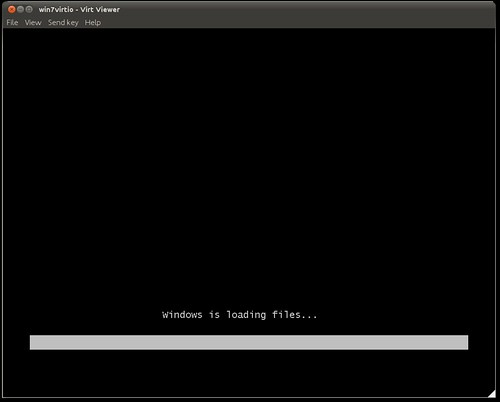
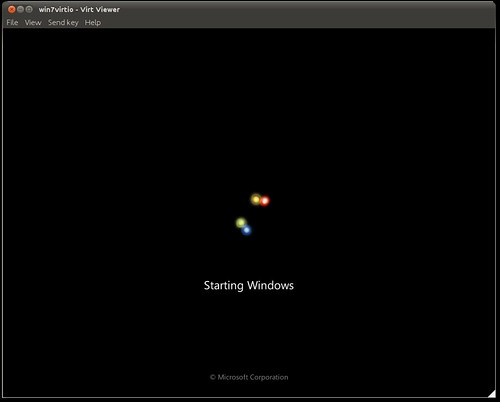
et voila Windows installer kicks in, we're greeted with the usual

Screenshot-win7virtio - Virt Viewer
Screenshot-win7virtio - Virt Viewer-1
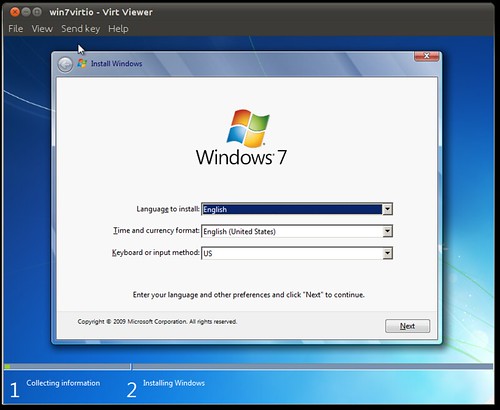
Next the welcome screen, and agree on the license agreement (if you want!)
Screenshot-win7virtio - Virt Viewer-2

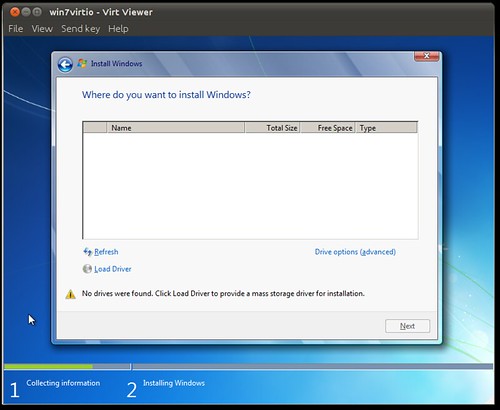
In this next screenshot, we see how Windows Installer does not see any "disks". This is because Windows now does not have any drivers for the virtio disk that we attached!
Screenshot-win7virtio - Virt Viewer-3

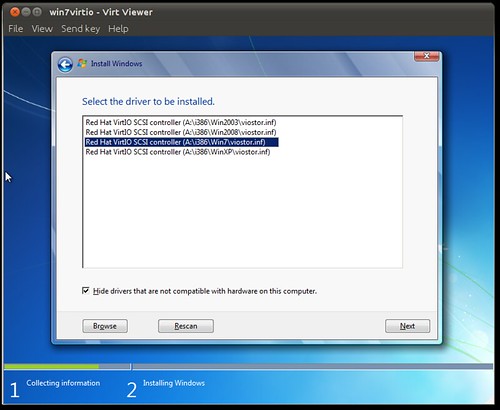
Let's fix that, clicking "Load Driver" and clicking OK, Windows starts reading the VFD virtual floppy image we attached, and detects the driver
Screenshot-win7virtio - Virt Viewer-3
Screenshot-win7virtio - Virt Viewer-5
Clicking Next, Windows can now see the virtio disk
Screenshot-win7virtio - Virt Viewer-5
Then it's business like usual
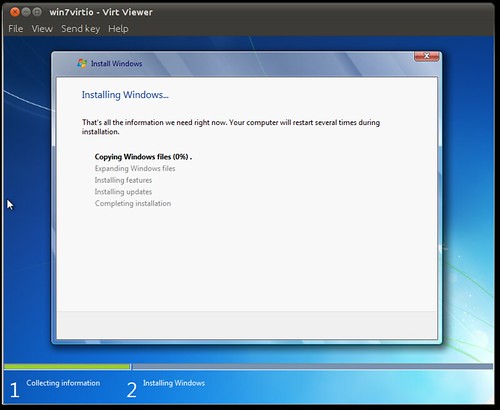
Screenshot-win7virtio - Virt Viewer-7
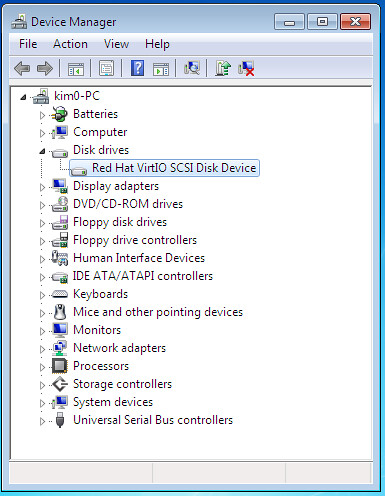
After installation completes, be sure to check the device manager and confirm the disk (and network) are both using optimized virtio drivers
DeviceManager

et voila, Windows in its full glory running over optimized virtio drivers. The only part that sucks is desktop VNC performance, something that I'll probably write about very soon :)

Wednesday, January 19, 2011

Hack on Ubuntu Cloud Utils

hack-cloud-small
Want a chance to hack on the cloud? Yes Ubuntu cloud code? What could possibly be cooler! For us cloud geeks, almost nothing! So, here's the deal. Ubuntu aims to be the best operating system for the cloud, period. Part of that is delivering code and utilities to ease common tasks for people working with Ubuntu as a guest cloud OS. For that I've suggested a utility to migrate ec2 ebs based images across different Amazon regions. Conceptually, what's needed is simple, a tool needs to be written to spin up two virtual servers in the two regions and sync the disks across them then terminate. The Ubuntu server team agrees it's a needed utility, and if done right, it should end up being shipped with Ubuntu (coolness!)

I have written step by step, what needs to be done to accomplish this task in a BluePrint. For those new to that term, BluePrints are Ubuntu's way of writing software specs in the open, where everyone can read and comment on them (don't you just love open!). So, if you're ready to start contributing, click that blueprint link, decide whether you want to hack on this tool, ping me and let's start working on it! For any questions or discussions, please drop by on Freenode IRC #ubuntu-cloud (if you're new to IRC, use this web UI instead http://cloud.ubuntu.com/community/irc-chat/). A great time to discuss this, would be today (Wed) 6pm-UTC during the weekly cloud community meeting. If you miss the meeting no problemo, just talk in the channel anytime, most people are there all the time anyway. I'm already hyper excited. Any questions or feedback? let me know in comments below